Friday, 15 March 2019

College Login web page using Html and Css


 <! create a college login web page..!>

<!DOCTYPE html>
<html>
<head>
<style>
a
{
  margin:10px;
  text-decoration:none;
  color:white;
}
ul li
{
 padding-top:10px;
 text-align:center;
 list-style:none;
 float:left;
 height:30px;
 width:100px;
 border-right:3px solid white;
}

nav
{
background-color:Deeppink;
height:40px;
font-size:20px;
}

ul li:hover
{
 background-color:DodgerBlue;
 color:white;
}

article
{
  border:2px solid blue;
  margin:2px;
  border-radius:20px;
  padding:5px;
  background-color:lightpink;
}

footer
{
  background-color:Darkred;
  color:white;
  text-align:right;
  height:30px;
  padding-top:10px;
  border-radius:10px;
}
span 
{
 font-size:30px;
}
p
{
   text-align:justify;
   padding:5px;
}


</style>
</head>

<body bgcolor="lightyellow">

    <header>
<img src="logo.png" align="center" width="150"/> &nbsp
<span >Aurora's Technology & Research Institute<span>
<hr/>
    </header>

<nav>
<ul>
    <li> <a href="#s3">Home</a></li>
<li> <a href="#s1">Courses</a></li>
<li> <a href="#s2">About us</a></li>
<li> <a href="#s4">Contact  </a></li>
<li> <a href="Login.html">Log in</a></li>
</ul>
</nav>
<br/> <br/> 

<marquee color="red"><h2 >Admissions are open today</h2></marquee>
   <form name="f1" method="post" action="login" id="f1">
     <center>
    Student Id :<input type="text" name="Student" value=""/><br><br>
Password :<input type="password" name="password" value=""/><br><br>
          <input type="submit" name="Login" value="LogIn"/>
     </center>
</form>

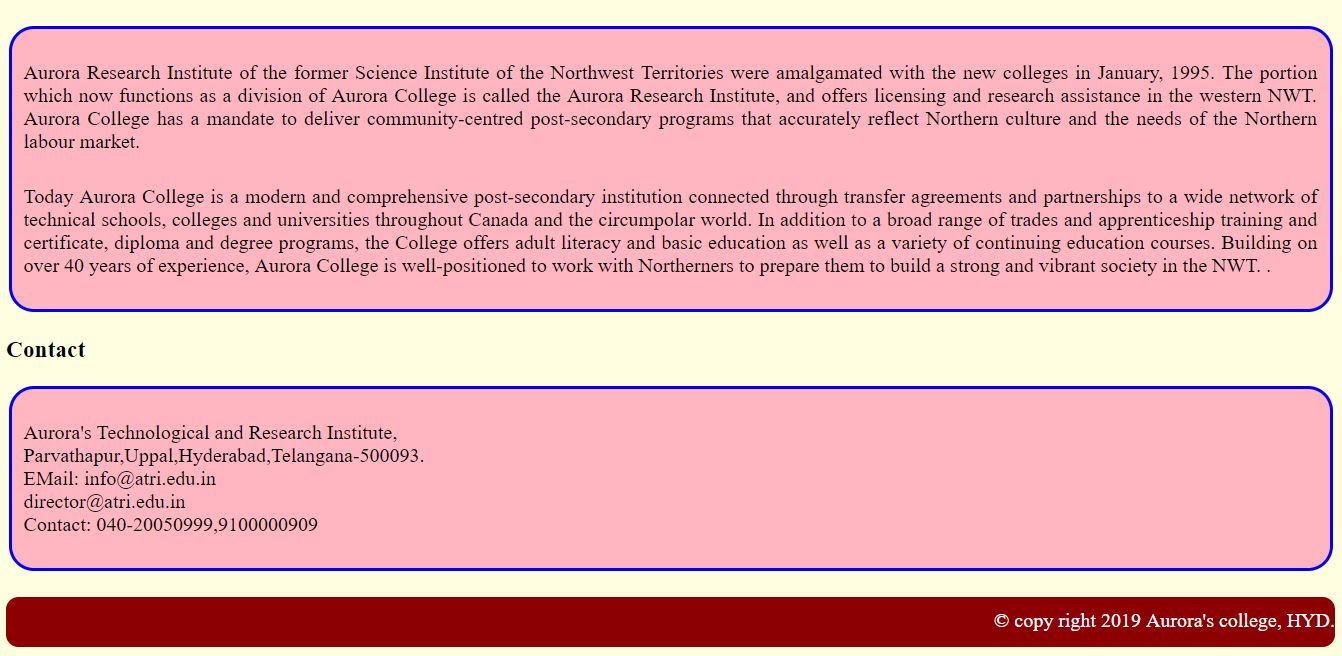
<section>
      
   <h3 id="s4">Contact</h3>
   <article>
   <p> Aurora's Technological and Research Institute,<br>
       Parvathapur,Uppal,Hyderabad,Telangana-500093.<br>
   EMail: info@atri.edu.in <br>
          director@atri.edu.in<br>
       Contact: 040-20050999,9100000909
   </p>
   </article>
</section>
<br/>  

<footer>
       &copy; copy right 2019 Aurora's college, HYD.
</footer>
</body>
</html>    


Thursday, 14 March 2019

College Web Pages Using Html and Css


<!DOCTYPE html>
<html>
<head>
<style>
a
{
  margin:10px;
  text-decoration:none;
  color:white;
}
ul li
{
 padding-top:10px;
 text-align:center;
 list-style:none;
 float:left;
 height:30px;
 width:100px;
 border-right:3px solid white;
}

nav
{
background-color:Deeppink;
height:40px;
font-size:20px;
}

ul li:hover
{
 background-color:DodgerBlue;
 color:white;
}

article
{
  border:2px solid blue;
  margin:2px;
  border-radius:20px;
  padding:5px;
  background-color:lightpink;
}

footer
{
  background-color:Darkred;
  color:white;
  text-align:right;
  height:30px;
  padding-top:10px;
  border-radius:10px;
}
span 
{
 font-size:30px;
}
p
{
   text-align:justify;
   padding:5px;
}


</style>
</head>

<body bgcolor="lightyellow">

    <header>
<img src="logo.png" align="center" width="150"/> &nbsp
<span >Aurora's Technology & Research Institute<span>
<hr/>
    </header>

<nav>
<ul>
    <li> <a href="#s3">Home</a></li>
<li> <a href="#s1">Courses</a></li>
<li> <a href="#s2">About us</a></li>
<li> <a href="#s4">Contact  </a></li>
<li> <a href="Login.html">Log in</a></li>
</ul>
</nav>
<br/> <br/> 

<marquee color="red"><h2 >Admissions are open today</h2></marquee>

<section>
       <h3 id="s3">Home</h3>
       <article>
   <p> 

            Aurora College delivers programs at three Campuses, 21 Community Learning Centres             and other community sites in the Northwest Territories.The Aurora Research Institute,               division of Aurora College, has three Research Centres since science must be accessible               to people and relevant to their everyday lives.Aurora Research Institute is dedicated to               the advancement of indigenous knowledge and the joining of indigenous knowledge with             western science.

          </p>
   
 <p>

           Aurora College delivers community-centred post-secondary programs that 
   accurately reflect northern culture and the needs of the northern labour market. 
   Aurora offers several certificate and diploma programs as well as  the Bachelor of                       Education Degree Program and the Bachelor of Science in Nursing   Program.
      </p>

   </article>
   <h3 id="s1">Courses</h3>
   <article>
   <h4>B.Tech</h4>
   <p>
            Information Technology.<br>
           Computer Science & Engineering.<br>
   Civil Engineering.<br>
   Mechanical Engineering.<br>
   Electronics Communication Engineering.<br>
   Electronics Electrical Engineering.
  </p>
    <h4>Deploma</h4>
<p>
   Computer Science & Engineering.<br>
   Electronics Communication Engineering.<br>
   Electronics Electrical Engineering.
</p>
   </article>
   <h3 id="s2">About us</h3>
   <article>
   <p>
              Aurora Research Institute of the former Science Institute of the Northwest Territories                  were amalgamated with the new colleges in January, 1995. The portion which now 
           functions as a division of  Aurora College is called the Aurora Research Institute, and                  offers licensing and research assistance in the western NWT. Aurora College has a                        mandate to deliver  community-centred post-secondary programs that accurately                        reflect Northern culture and the needs of the Northern labour market.

   </p>
      <p>
                  Today Aurora College is a modern and comprehensive post-secondary institution                          connected through transfer agreements and partnerships to a wide network of                              technical schools,colleges and universities throughout Canada and the circumpolar                      world. In addition to a broad range of trades and apprenticeship training and                               certificate, diploma and degree programs, the College offers adult literacy and basic                      education as well as a variety of continuing education courses. Building on over 40                       years of experience, Aurora College is well-positioned to work with Northerners to                        prepare them to build a strong and vibrant society in the NWT. .
   </p>
   </article>
   <h3 id="s4">Contact</h3>
   <article>
   <p>
                  Aurora's Technological and Research Institute,<br>
          Parvathapur,Uppal,Hyderabad,Telangana-500093.<br>
  EMail: info@atri.edu.in <br>
           @atri.edu.in<br>
         Contact: 040-20050999,9100000909
   </p>
   </article>
</section>
<br/>  

<footer>
       &copy; copy right 2019 Aurora's college, HYD.
</footer>
</body>
</html>    


Friday, 8 March 2019

APPLYING CSS ON NUMBERS

<!--create a web page to apply the styles to list items so that display the item in circle format-->

<html>
<head>

<style>

#list1
{
 border:2px solid blue;
 width:120px;
 height:120px;
 padding:5px;
}

#list1 li
{

 border-radius:50px;
 text-align:center;
 background-color:blue;
 color:white;
 height:30px;
 width:30px;
 float:left;
 margin:5px;
 list-style:none;
 font-size:20px;

}
</style>
</head>
<h3>applying styles using CSS3</h3>
<hr/>

<ul id="list1">
           <li>1</li>
   <li>2</li>
   <li>3</li>
   <li>4</li>
   <li>5</li>
   <li>6</li>
   <li>7</li>
   <li>8</li>
   <li>9</li>
</ul>
</body>
</html>

Monday, 18 February 2019

FISH ANIMATION USING CSS3


<!create a web page fish animation using css3 !>
<html>
<head>
<style>
#m3
{
  position:absoute;
  left:250px;
  top:-5
}
</style>
</head>
<body background="ocean.jpg">

<marquee scrollamount="5" direction="left">
<img src="fish1.gif" width="140" height="100" />
</marquee>
<marquee scrollamount="5" direction="right">
<img src="fish2.gif" width="140" height="100" />
</marquee>
<marquee id="m3" scrollamount="5" direction="down" height="500">
<img src="fish1.gif" width="140" height="100" />
</marquee>
<marquee scrollamount="5" direction="left">
<img src="fish3.gif" width="140" height="100" />
</marquee>


</body>
</html>

VINAYAKA ANIMATION USING CSS


<!create a web page vinayaka animation using css !>

<html>
<head>
<style>
h1
{ 
  border-width:2px;
  font-family:'tahoma';
  color:green;
  
}
</style>
</head>
<body bgcolor="orange">

<marquee direction="right" scrollamount="5"><h1>Happy vinayaka chavithi</h1> </marquee>
<br/>
<marquee scrollamount="10"><img src="vinayaka.gif" width="130"/> </marquee>
<br/>
<marquee direction="right" scrollamount="5"><img src="ganesh.gif" width="200"/> </marquee>

<marquee direction="right" scrollamount="10"><img src="vinayaka.gif" width="130"/> </marquee>

</body>
</html>

Thursday, 7 February 2019

HTML 5 Graphics -SVG Demo


  1.  <html>
  2. <head>
  3. </head>
  4. <body>
  5. <h1> HTML 5 Graphics -SVG </h1>
  6. <hr/>

  7. <svg id="svg1" width="300" height="300" style="border:2px solid blue;">
  8. <line X1="0" Y1="0" X2="300" Y2="300" style="stroke:red; stroke-width:5"/>

  9. <line X1="20" Y1="0" X2="300" Y2="280" style="stroke:green; stroke-width:5"/>

  10. <line X1="0" Y1="20" X2="280" Y2="300" style="stroke:blue; stroke-width:5"/>

  11.  <line X1="300" Y1="0" X2="0" Y2="300" style="stroke:black; stroke-width:5"/>
  12.  
  13.  <line X1="0" Y1="280" X2="280" Y2="0" style="stroke:yellow; stroke-width:5"/>
  14.  
  15.  <line X1="320" Y1="0" X2="0" Y2="320" style="stroke:pink; stroke-width:5"/>
  16.  
  17. < circle cx="150" cy="150" r="60" stroke:red stroke-width:3 fill="green"/>

  18.  <circle cx="150" Cy="150" r="30" stroke:red stroke-width:2 fill="lightblue"/>
  19. </svg>

  20. </body>
  21. </html>


Saturday, 1 September 2018

PSPK ANIMATION


<!--create a web page to apply animation to image tag by using css Animation-->

<!DOCTYPE html>
<html>
<head>
<style>
#x
{
 border:2px solid green;
 background-color:green;
 color:white;
 text-align:center;
 width-left:400px;
 padding:10px;
 border-top-left-radius:20px;
 border-bottom-right-radius:20px;
}
h2
{
 color:blue;
 text-shadow:0px 0px 5px green;
}

@keyframes Animation1
{
 from {width:100px;height:60px;transform:rotate(0deg);}
 to {width:600px;height:400px;transform:rotate(360deg);}
}
#img1
{
 width:100px;
 height:60px;
 border:0px solid blue;
 border-radius:10px;
 padding:5px;
 margin-left:50px;

 Animation-name:Animation1;
 Animation-duration:20s;
 Animation-iteration-count:5;
 Animation-direction:alternate;
 Animation-delay:4s;

}
</style>
</head>

<body bgcolor="orange">
<h1 id="x">PAVAN KALYAN</h1>
<marquee><h2>HAPPY BIRTHDAY PSPK PAVANISM</h2></marquee>
<br></br>
<img id="img1" src="pspk.jpg"/>
<img id="img1" src="pk.jpg"/>

</body>
</html>