Showing posts with label design. Show all posts

Saturday, 6 July 2019

Horizontal paragraphs information using html and CSS3


<html>
<head>
<style>
#div1::first-letter
{
 color:green;
 font-size:40px;
}

#div1
{
  background-color:lightyellow;
  border:2px solid green;
  padding:5px;
  text-align:justify;
  column-width:150px;
  column-rule:5px double green;
 }
</style>
</head>
<body>
 <h1 align="center">CSS3</h1>
 <hr></hr>
 <div id="div1">
Hyderabad Sunrisers  captain Mr.Scott credited his bowlers after his side 
registered a 
massive 10-wicket win over Gujarat Lions on Thursday night. Opting to bowl,
 Bhuvneshwar Kumar's four for 29 helped SRH restrict Gujarat Lions to 135 for eight on a two-paced track.

Boosted by his team's bowling performance, 
Shikhar Dhawan too roared back to form to hit an unbeaten 53 as SRH posted their second successive victory in the Indian Premier League 2016. Skipper Warner too continued with his rich vein of form to hit 74 not out off just 48 balls.
<br><br>
"I have to give credit to the bowlers. Gives us a great opportunity to play the way we want to play with the bowlers restricting the opposition. Our bowlers were fantastic. Bhuvi and Fizzy, his change of pace is very different. I faced him in Bangalore and he tried to knock my block off. It's a great art to change the pace as he does.
<br><br>
"Proud of the way the bowlers are bowling and if we keep chasing totals like this, we'll go a long way in the tournament," Warner said.
<br><br>
Man of the Match Bhuvneshwar Kumar was elated with his performance and said Aaron Finch's wicket was a big boost.<br>
<br>
"It was a big boost. He was the one who scored runs for them, won all three matches for them. Wanted to get him early on. Heavily dependent on top three, they are. If we could get them out, the team wouldn't score too many," Bhuvneshwar said. 

Sunrisers Hyderabad captain David Warner credited his bowlers after his side registered a massive 10-wicket win over Gujarat Lions on Thursday night. Opting to bowl, Bhuvneshwar Kumar's four for 29 helped SRH restrict Gujarat Lions to 135 for eight on a two-paced track.

Boosted by his team's bowling performance, Shikhar Dhawan too roared back to form to hit an unbeaten 53 as SRH posted their second successive victory in the Indian Premier League 2016. Skipper Warner too continued with his rich vein of form to hit 74 not out off just 48 balls.
<br><br>
"I have to give credit to the bowlers. Gives us a great opportunity to play the way we want to play with the bowlers restricting the opposition. Our bowlers were fantastic. Bhuvi and Fizzy, his change of pace is very different. I faced him in Bangalore and he tried to knock my block off. It's a great art to change the pace as he does.
<br><br>
"Proud of the way the bowlers are bowling and if we keep chasing totals like this, we'll go a long way in the tournament," Warner said.
<br><br>
Man of the Match Bhuvneshwar Kumar was elated with his performance and said Aaron Finch's wicket was a big boost.<br>
<br>
"It was a big boost. He was the one who scored runs for them, won all three matches for them. Wanted to get him early on. Heavily dependent on top three, they are. If we could get them out, the team wouldn't score too many," Bhuvneshwar said. 
 </div>

</body>
</html>

Monday, 1 July 2019

online product details page using html and css


<!DOCTYPE html>
<html> 
<head>
<style>
figure
{
  border:1px solid blue;
  width:250px;
  text-align:center;
  padding bottom:20px;
  border-radias:5px;
}
</style>
</head>
<body>
<h1>HTML5 semantic Tags </h1>
<hr> </hr>
<figure>
<img border="0" src="iphone.jpg" width="200"/>
<figcaption>product name:iphone 7s </figcaption>
</figure>
<br/> <br/>
<details>
<summary>show/hide product features</summary>

<ul>
<li>1715 mAH li-ion Battery</li>
<li>2GB RAM|16GB ROM </li>
<li>icloud</li>
<li>16MP primary camera|5MP front</li>
<li>5.7 inch retina Display</li>
<li>photo and video geotagging</li>
</ul>
</details>
</body>
</html>


</html>

Saturday, 15 June 2019

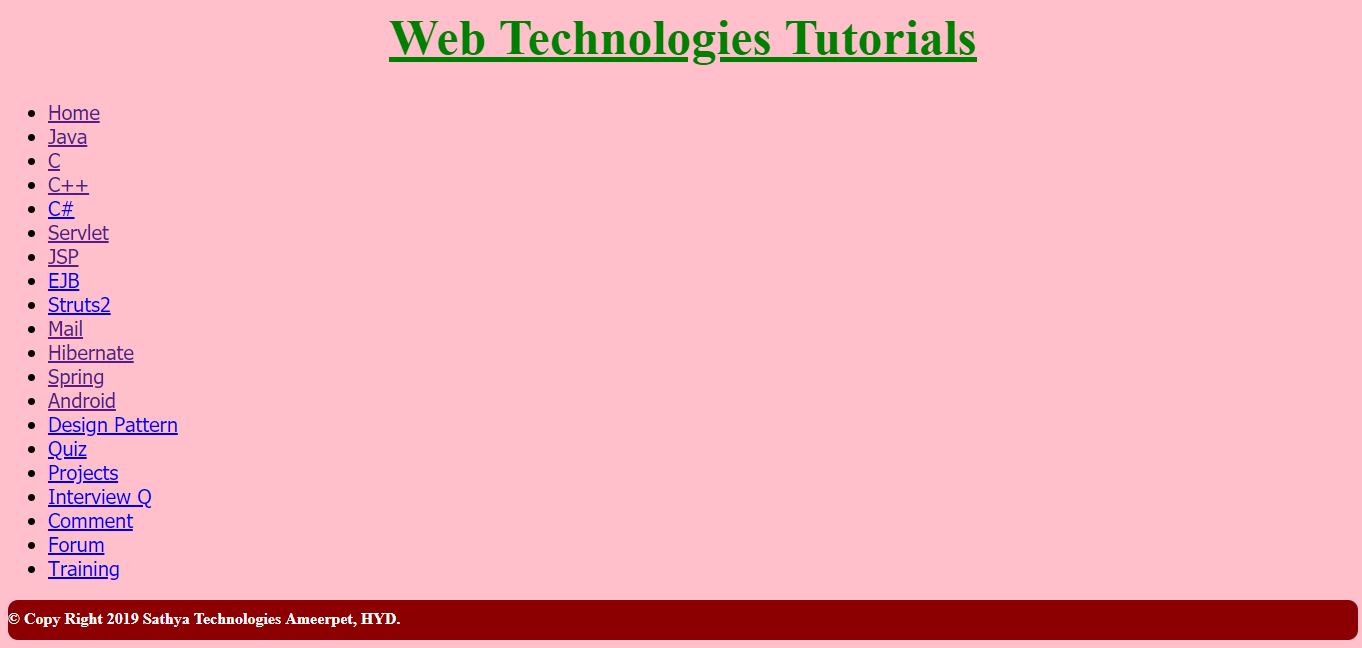
Tutorail home page designing using html and css


   Tutorail home page designing using html and css

<html>
<head>
<style>
.list
{
 font-size:20;
 font-family:tahoma;
}
h1
{
 color:green;
 text-align:center;
 font-size:50;
}
footer
{
  background-color:Darkred;
  color:white;
  text-align:justify;
  height:30px;
  padding-top:10px;
  border-radius:10px;
}
</style>
</head>
<body bgcolor=pink>
<div class="main">
<div>
<h1><u>Web Technologies Tutorials</u></h1>

</div>
<div class="list"> 
<ul>
<li><a href="https://www.javatpoint.com">Home</a></li>
<li><a href="java.html" class="selected">Java</a></li>
<li><a href="c.html">C</a></li>
<li><a href="c++.html">C++</a></li>
<li><a href="c-sharp-tutorial">C#</a></li>
<li><a href="servlet.html">Servlet</a></li>
<li><a href="jsp.html">JSP</a></li>
<li><a href="ejb-tutorial">EJB</a></li>
<li><a href="struts-2-tutorial">Struts2</a></li>
<li><a href="mail.html">Mail</a></li>
<li><a href="hibernate.html">Hibernate</a></li>
<li><a href="spring.html">Spring</a></li>
<li><a href="android.html">Android</a></li>
<li><a href="design-patterns-in-java">Design Pattern</a></li>
<li><a href="examaccess">Quiz</a></li>
<li><a href="free-java-projects">Projects</a></li>
<li><a href="corejava-interview-questions">Interview Q</a>
<li><a href="comment.html">Comment</a>
<li><a href="forum.html">Forum</a>
<li><a href="training.html">Training</a>
</li>
</ul>
</div>
</div>
<footer><b>&copy; Copy Right 2019 Sathya Technologies Ameerpet, HYD.<b></footer>
</body>
</html>

Friday, 7 June 2019

Simple Calculator using Html Css and JavaScript

  Simple Calculator using Html Css and JavaScript 


<html>
<head>
<style>
.button
{  
  width:50;
  height:50;
  font-size:25;
  margin:2;
  cursor:pointer;
  background:#607d8b;
  border:none;
  color:white;
}
.textview
{
  width:225;
  margin:5;
  font-size:25;
  padding:5;
  border:none;
  color:#607d8b;
}
.main
{
  position:absolute;
  top:50%;
  left:50%;
  transform:translateX(-50%)translateY(-50%)
}
.bg

  background:linear-gradient(to right,#e91e63,#3151b5);
  height:100%;

}
h1
{
 position:absolute;
 top:10%;
 left:42%;
 font-size:30;
}
</style>
<script>

function insert(num)
{
  document.form.textview.value=document.form.textview.value+num 
   
}
function equal()
{
  var exp=document.form.textview.value;
  if(exp)
  {
    document.form.textview.value=eval(exp);
  }
}
function clean()
{
  document.form.textview.value="";
}
function back()

 var exp=document.form.textview.value;
  document.form.textview.value=exp.subString(0,exp.lenth-1);

}
</script>
</head>
<body> 
     <h1> Simple Calculator</h1>
       <div class="bg"></div>
      <div class="main">
  <form name="form">
  <input class="textview" name=textview>
  </form>
  <table>
  <tr>
        <td> <input class="button"  type="button"  value=C onclick="clean()"></td>
<td> <input class="button"  type="button" value=< onclick="back()"></td>
<td> <input class="button"  type="button" value=/ onclick=insert("/")></td>
<td> <input class="button"  type="button" value=* onclick=insert("*")></td>
  </tr>
   <tr>
        <td> <input class="button"  type="button" value=7 onclick=insert(7)></td>
<td> <input class="button"  type="button" value=8 onclick=insert(8)></td>
<td> <input class="button"  type="button" value=9 onclick=insert(9)></td>
<td> <input class="button"  type="button" value="=" onclick="equal()"></td>
  </tr>
   <tr>
        <td> <input class="button"  type="button" value=4 onclick=insert(4)></td>
<td> <input class="button"  type="button" value=5 onclick=insert(5)></td>
<td> <input class="button"  type="button" value=6 onclick=insert(6)></td>
<td> <input class="button"  type="button" value=- onclick=insert("-")></td>
  </tr>
   <tr>
        <td> <input class="button"  type="button" value=1 onclick=insert(1)></td>
<td> <input class="button"  type="button" value=2 onclick=insert(2)></td>
<td> <input class="button"  type="button" value=3 onclick=insert(3)></td>
<td rowspan=5> <input class="button" style="height:106"  type="button" value=+ onclick=insert("+")></td>
  </tr>
   <tr>
        <td colspan=2> <input class="button" style="width:106"  type="button" value=0 onclick=insert(0)></td>
<td> <input class="button"  type="button" value=. onclick=insert(.)></td>
   </tr>
  </table>
</body>
</html>

Sunday, 14 April 2019

Local Drives Design Using Html


<html>
<head>
<title>Local Drives</title>
</head>
<body bgcolor=lightgreen>
<fieldset>
<center>
 <h1>Local Drives:</h1>
<label><b>Local Drive(C:)</b></label><br/>
<progress max='10' value='5'>
</progress> <br><br/>
<label><b >Local Drive(D:)</b></label><br/>
<progress max='10' value='8'>
</progress><br><br/>
<label><b >Local Drive(E:)</b></label><br/>
<progress max='10' value='3'>
</progress><br><br/>
<label><b >CD/DVD Drive(F:)</b></label><br/>
<progress max='10' value='1'>
</progress><br><br/>
</center>
</fieldset>
</body>
</html>